
Why Do Hybrid Offices Depend on Interactive Displays for Better Collaboration?

Daisy Li
Display Solutions & Product Technology Expert
Specializing in OEM/ODM smart display solutions from 21.5″ monitors to 110″ interactive flat panels, with expertise in product configuration, system integration, quality control, and bulk project delivery for global B2B markets.
Follow me:
You’ve probably been in that meeting where half the room is physically present, the other half are small faces in video boxes, and at least one distant colleague has spent the last five minutes attempting to gain someone’s attention to say something. Ideas fall through cracks. Decisions are decided before anyone has a say.
The solution to this gap lies in a growing concept: Meeting Equity—the principle that remote and in-person participants deserve equal access and equal voice. Many hybrid meetings suffer from “presence disparity,” where remote attendees are routinely talked over or overlooked. It’s a persistent problem that only gets worse as teams grow.
The practical fix is better collaboration infrastructure. Interactive displays for hybrid workplace are becoming the core of that trend. This article explains why this is, what to look for in a solution, and how interactive flat panels are designed to meet these real world expectations.
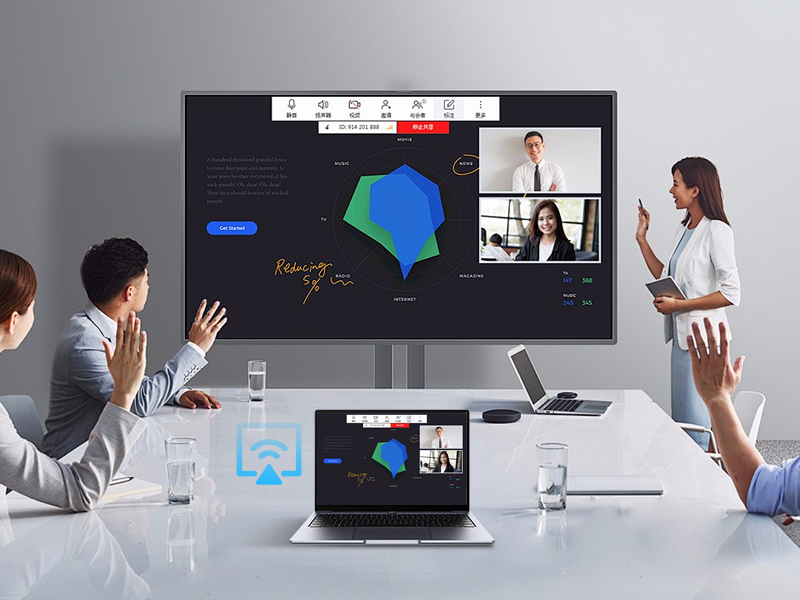
Solving Common Challenges in Hybrid Meetings with Interactive Displays
Hybrid work is now a permanent feature. And corporations are increasingly structuring workspaces around that choice. Flexibility without the correct instruments generates friction. Now, let’s look at the most prevalent pain spots and how interactive displays solve them.
All-in-One Displays Make Meeting Room Setups Easier
Is your meeting room a cable management nightmare? Separate laptop, HDMI dongle, external webcam, Bluetooth speaker, and a projector that takes three minutes to warm up.
One of the most overlooked reasons of meeting irritation is too many devices. Every additional cable is a potential failure point. Any change of gadget costs you time and attention.
With a high quality touch screen display that integrates touch/writing, wireless projection, an embedded Android or Windows system, and speakers all in one box, Interactive Flat Panels are a truly all-in-one solution. It totally replaces the old projector/whiteboard combo. Setup time drops to virtually zero, and the “does anyone have the right adapter?” argument is over forever.
Enabling Real-Time Collaboration for Hybrid Teams
One of the most important lessons learned from studying hybrid teams is that engagement plummets when remote individuals cannot participate with what they are seeing—they are watching, not engaging.
Multi-touch multi-user interactive display for office use allows for simultaneous brainstorming, annotation and editing of content on either side of a call by team members. Whether you’re annotating a project plan or mapping out a workflow diagram, the display turns a passive presentation into a live working session.
This touchscreen transforms the dynamics of meetings in a fundamental way. It injects excitement into discussions and allows everyone—those in the room and distant—a visible means to contribute ideas in real-time.
Ensuring Seamless Compatibility Across Multiple Devices
Hybrid teams employ a range of gadgets. One person is on a MacBook, one coworker is on a Windows laptop, and the distant participant just jumped on from their iPad. Compatibility headaches are real.
Interactive displays receive input from several sources, such as laptops, Mini PCs and OPS modules, with touch, annotation and content management functions common to all connected devices. The panels support Windows and Android environments, so your existing tools—whether that’s Microsoft Teams, Zoom or a custom enterprise application—function nicely without a platform change.

Supporting Scalable and Secure Workplace Deployment
For IT managers and procurement teams, rolling out new technology across various office sites is seldom as straightforward as “just plug it in.” Tenfly’s products are built for enterprise-grade deployment.
The interactive displays are designed for real-world business contexts, allowing businesses, co-working spaces and system integrators to construct dependable, scalable and secure workplaces—from conference rooms and executive offices to open-plan and hybrid workspaces. The hardware is designed for reliable performance under a variety of deployment settings, and developed with ISO-certified quality standards and extensive testing, including temperature variation, voltage fluctuation, and vibration tests.
Enhancing Presentation Quality and Meeting Engagement
An interactive display gives you the ability to stand up and actively brainstorm with colleagues on a digital whiteboard. Crisp 4K resolution, anti-glare display surfaces and sensitive touch precision mean what’s displayed on screen is genuinely legible from every seat, and every faraway window.
Here’s a quick summary of how interactive displays affect the meeting room equation:
Comparison Table
| Dimension | Traditional Meeting Rooms | Hybrid Offices with Interactive Displays |
| Equipment Needed | Projector, laptop, cables, whiteboard, speakers | Single all-in-one interactive flat panel |
| Setup Time | Several minutes per meeting | Under 1-2 minute, wireless ready |
| Interactive Ability | Presenter-only, passive audience | Multi-user touch, real-time annotation |
| Space Requirement | Projector throw distance, screen + board | Wall-mounted or mobile stand, compact footprint |
| Remote Worker Experience | Often disadvantaged, poor audio/video | Equal participation with shared interactive canvas |
Typical Use Cases for Interactive Displays in Hybrid Offices
1. Data-Driven Boardroom for Executive Decision Making
Executives have to make quick, educated judgments and that means presenting data cleanly and reacting to it in real time. An interactive display allows leadership teams to pull up dashboards, annotate charts, and redirect discussions without losing the thread.
With the shared interactive screen, everyone is working from the same information at the same time, even when half the board is joining remotely.
2. Training Sessions: Interactive onboarding for remote workers
The old way to onboard a new hire in another city was to ship them a stack of PDFs. In the training room, facilitators may conduct engaging, participatory sessions using interactive flat panels where new team members—remote or in-person—can interact with content, visually ask questions and remember more of what they learn.
3. Global Teams: Breaking Down the Geographical Barrier
For firms with offices in several time zones, asynchronous communication only gets you so far. Regular live sessions with collaborative interactive displays enable distant teams stay aligned, build culture and momentum. Wireless casting from any device and real-time annotation means there is no excuse for geography to cause misinterpretation.
4. Presentations to Clients: Making a Lasting Professional Impression
First impressions count. After all, walking a potential client through a proposal on a bright, responsive 75-inch interactive display is much more impressive than a laptop screen oriented toward a conference table. It shows that your organization values quality and approaches the meeting with seriousness.

How to Choose an Interactive Display Manufacturer
Not all interactive displays are the same. What makes an excellent solution stand out? Here’s the deal:
- Display Quality and Touch Accuracy. Resolution, anti-glare coating and touch sensitivity influence if the monitor is actually utilized or becomes pricey wall-art. Look for true multi-touch capabilities with low latency.
- All-in-One Audio & Video. A separate mic array and webcam defeat the whole point of “all-in-one.” Conferencing should be built into the system, not an add-on.
- OS Compatibility and Software Ecosystem. Your presentation should operate with the tools your team already has, not demand them to adapt workflows to fit the gear.
- Reliable after-sales service and customization. Enterprise installations require fast support, firmware updates, and the ability to adapt hardware or software to particular situations. If a manufacturer disappears after the transaction, then you have a liability.
Why Tenfly meets these requirements
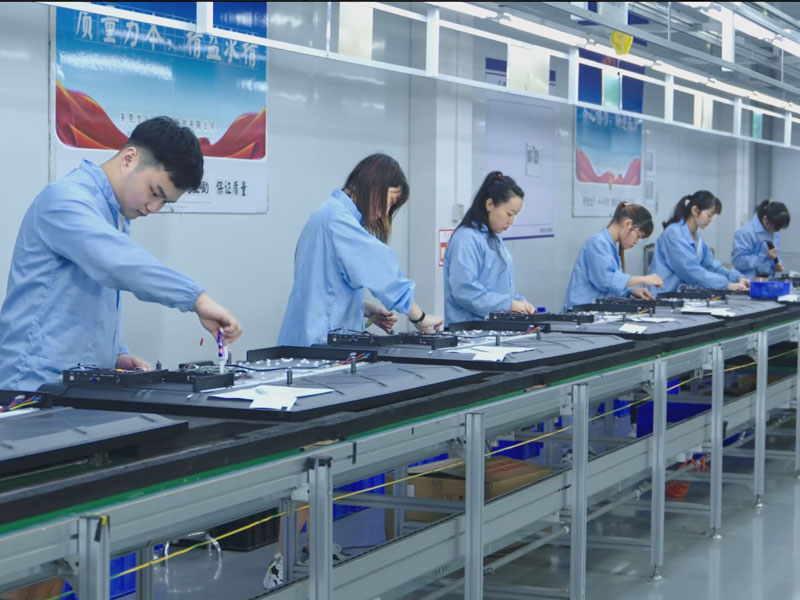
As a manufacturer with 30 years of experience, Tenfly has three manufacturing bases and 50+ experienced in-house R&D engineers.
The IFP line-up checks all the boxes from the previous section: high-resolution display, touch/writing, wireless projection, built-in systems and speakers. The panels take in input from multi-device and OPS modules, so they can integrate into most existing room setups without a complete infrastructure revamp.
For bigger, more sophisticated installations, Tenfly provides OEM/ODM configuration—fine tuning display specs, interface options or software environments for specific use cases. Fast response commitment to after sales assistance that makes a meaningful impact in practice when you’re spreading out across several sites.
Transform Your Hybrid Meetings with Tenfly
Hybrid work is here to stay. The question is, do your meeting rooms have the right setup to accommodate it, or are your remote colleagues still there to watch while the real talks are happening in the room?
Interactive displays aren’t a luxury addition; they’re the infrastructure that makes hybrid collaboration actually work. And picking the appropriate manufacturer is just as important as choosing the correct product.
Ready to enhance your hybrid meeting experience? Discover the perfect fit for your business with Tenfly’s Interactive Displays line.
Contact Tenfly today for a free consultation.
