
Industrial Monitors vs Ordinary Commercial Monitors: What Are the Functional and Operational Differences?

Daisy Li
Display Solutions & Product Technology Expert
Specializing in OEM/ODM smart display solutions from 21.5″ monitors to 110″ interactive flat panels, with expertise in product configuration, system integration, quality control, and bulk project delivery for global B2B markets.
Follow me:
When sourcing display equipment for corporate or project needs, monitors are often the most misunderstood devices. On the surface, both industrial and commercial monitors display images. However, because they are engineered for entirely different application environments and survival rules, they exhibit significant “hardcore” differences in functionality and usage.
We can break down these core differentiators into three main dimensions: Performance, Design, and Application Scenarios.
Similarities Between Industrial and Commercial Displays
Monitors. Despite the vastly different application environments, as display terminals, they still share commonalities in underlying technology and basic demands, and therefore share many common features.
- In terms of pure display capability, there is no fundamental difference between the two.
- Both support an HD display.
- Basic Interface Compatibility: To connect to computing devices, both support universal video signal interfaces, such as HDMI, DisplayPort (DP), or traditional VGA.
- Control Adjustment: Both feature OSD (On-Screen Display) functions, allowing users to manually adjust basic parameters like brightness, contrast, image position, etc.
- Intelligence and Touch Trend: With the development of human-computer interaction, both are introducing touch technology (capacitive/resistive touch) and supporting a certain degree of remote centralized management.
Industrial Monitors VS Ordinary Commercial Monitors: Main Differences
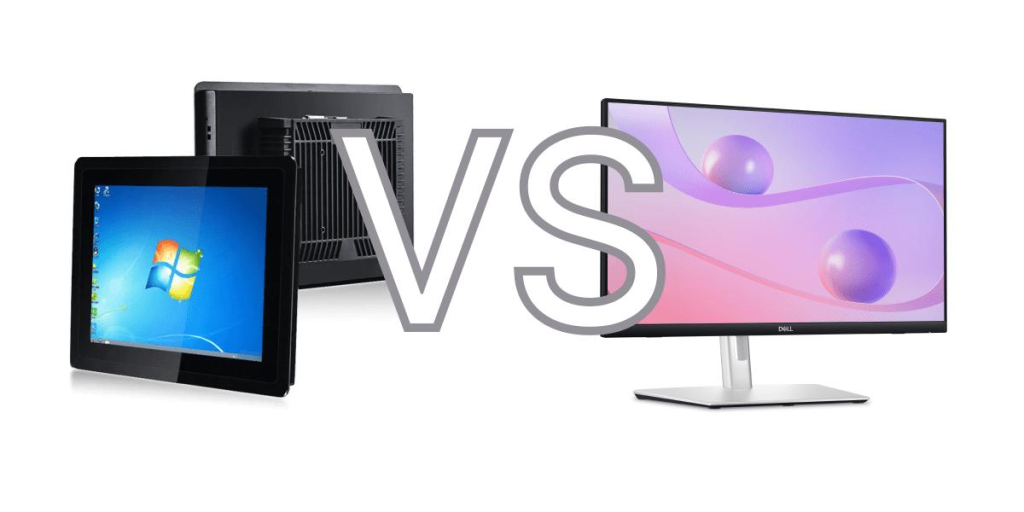
Performance Differences: Ordinary for Peace of Mind, Industrial for “Hardcore”
Environmental Adaptability (Wide Temp vs. Room Temp)
- Ordinary Commercial Monitors: Designed specifically for climate-controlled, dry, and clean office environments. They are highly sensitive to dust, moisture, and temperature fluctuations (typically operating within 0℃ to 40℃. If placed in a workshop without air conditioning, they can easily fail due to poor heat dissipation or condensation.
- Industrial Monitors: Dubbed the “masters of survival.” Featuring a wide-temperature design, they typically operate stably in extreme environments from -10℃ to 60℃ (with specialized products reaching -20℃ to 70℃. They are also inherently resistant to high levels of vibration and mechanical shock, allowing them to withstand the constant humming of factory machinery.
Resolution & Display Precision (Vibrant Colors vs. Precise Reproduction)
- Ordinary Commercial Monitors: Focus on high color gamut (sRGB, DCI-P3), high refresh rates, and daily eye protection features (such as low blue light and flicker-free technology). The color tuning is optimized for human visual comfort during long office hours.
- Industrial Monitors: Prioritize visibility and professional precision under extreme conditions. For instance, in medical imaging fields (such as ultrasound or DR testing), they require ultimate grayscale resolution to accurately present minute physiological structures and lesions, leaving no room for color distortion.
Brightness & Viewing Angles (High Brightness/Anti-Glare vs. Standard Brightness)
Ordinary Commercial Monitors: Feature lower brightness (usually 250 – 350 cd/m2). Near sunlit windows or outdoors, the screen will wash out, go pitch black, or reflect severely, and the viewing angle is relatively narrow.
Industrial Monitors: Equipped with ultra-high brightness output (typically 500 – 1500 cd/m2) paired with anti-glare (AG) surface treatments. This ensures that data remains crystal clear even under direct sunlight on outdoor EV charging piles or self-service terminals. They also offer wide viewing angles, preventing color shifting when multiple operators view the screen obliquely from the side.
Design Differences: External Defense Line & Internal Character
Shell Material & Ingress Protection (Rugged Metal vs. Lightweight Plastic)
- Ordinary Commercial Monitors: Constructed mostly with engineering plastic enclosures to achieve narrow bezels, slim profiles, and aesthetics. However, the shells are fragile and offer almost zero dustproof or waterproof capability.
- Industrial Monitors: Built with robust full aluminum alloy, stainless steel, or sheet metal structures that resist heavy impacts. The front panel or the entire chassis usually carries strict Ingress Protection ratings (such as IP65/IP67), completely sealing out oil stains, iron filings, splashing water, and chemical dust.
Touch & Operation Methods (Multi-Condition Touch vs. Traditional Keyboard/Mouse)
- Ordinary Commercial Monitors: Mostly do not support touch, relying heavily on a keyboard and mouse. The few commercial touch screens available only support standard, bare-finger light touch.
- Industrial Monitors: Generally integrate highly reliable, industrial-grade touch screens. On production lines, they allow operators to interact while wearing thick latex or canvas work gloves. They can also accurately detect touch inputs even when the surface is smeared with water stains or grease, effectively preventing accidental inputs during critical operations.
Electrical Anti-Interference (EMC/EMI Protection)
Ordinary Commercial Monitors: Built to meet standard consumer-grade radiation and interference regulations. If placed in an industrial workshop surrounded by large motors and frequency inverters, the screen is prone to flickering, water ripples, or going blank.
Industrial Monitors: Engineered with rigorous electromagnetic shielding and wide-voltage input protection. They are immune to complex electromagnetic interference (EMI), ensuring uninterrupted, stable 24/7 data output.
Convenience, Intelligence, and Life Cycle
Installation and Collaboration
Commercial screens come with built-in desktop bases, plug-and-play, and feature office collaboration functions like Type-C one-cable connection and smart split-screen. In contrast, industrial screens emphasize embedded installation, rack mount, or VESA wall mount, and the interfaces are often designed with screw locks to prevent cables from falling off due to vibration.
Supply Life Cycle
Ordinary commercial monitors iterate extremely fast, usually facing discontinuation and updates within 1-2 years. However, industrial projects require high consistency in equipment, so industrial monitors usually provide 5 – 10 years of long-term stable supply and locked-down dimensions, facilitating subsequent maintenance and replacement.
Application Scenario Differences: Specialization in Different Fields
| Dimension | Ordinary Monitors | Industrial Monitors |
| Core Material | Plastic shell, slim and stylish | Metal shell, robust and heavy |
| Core Advantages | High cost-effectiveness, soft colors, plug-and-play | High/low temperature resistance, dustproof & waterproof, anti-electromagnetic interference |
| Operation Method | Primarily keyboard and mouse | Industrial-grade touch (supports gloves, anti-misoperation) |
| Typical Application Scenarios | Daily office work (documents, spreadsheets), home entertainment (watching shows, gaming), light professional work | Automated production lines (central control, HMI), transportation (vehicle navigation, dispatch command), medical field (high-precision medical imaging equipment) |
Ordinary commercial monitors are suitable for:
- Office: Office software; proficiency tasks; ERP systems;
- Entertainment: Videos, gaming;
- Design: Photoshop; CAD; video editing;
- Commercial Environments: Cashier systems; meeting rooms; education and training.
Industrial Monitors apply to
- Industrial Automation: PLC control; SCADA systems; MES systems;
- Smart Manufacturing: Automated production lines; AGV robots; CNC machine tools;
- Outdoor Equipment: Charging piles; self-service terminals; smart city equipment;
- Medical Equipment: Ultrasound equipment; testing equipment;
- Transportation: Subway systems; vehicle-mounted terminals; dispatch centers.
So, can they replace each other?
Commercial replacing Industrial? [Absolutely Not]
If you attempt to stuff an ordinary commercial monitor into a sealed industrial cabinet, a dust-filled production line, or an outdoor terminal exposed to scorching sunlight just to save initial costs, it will typically fail within a few weeks or even days due to high-temperature overheating, static accumulation, dust short-circuits, or severe glare, and may even cause safety hazards.
Industrial replacing Commercial? [Yes, but unnecessary]
Industrial monitors can certainly be connected to an office computer to handle spreadsheets or documents. However, their high procurement cost, relatively mediocre color tuning for office use (biased towards high brightness rather than soft eye protection), and the lack of a desktop stand design will make them highly inconvenient for office employees to use.
Contact Tenfly today for a free consultation.
